Dissecting Droid: Reversing Bun Executables
Motivation
I was bouncing around various CLI coding agent harnesses (Claude Code, OpenCode, Droid by Factory, etc.). Droid appeared to be closed source, and I was curious about the implementation. I opened it in Binary Ninja and noticed references to V8 and some embedded JS. After poking around a bit more, I realized it was built with Bun.
I went to the Bun source to see how it packages standalone executables. Depending on build flags, you can recover the original project structure and source files directly. In Droid’s case: a few hundred source files and a handful of embedded assets.
Creating a Target
Before pulling apart Droid, let’s understand the format with a minimal test case.
Here’s a tiny program to use as a test case:
// index.ts
import { dep } from "./dep";
console.log("INDEX_MAGIC:" + dep());
// dep.ts
export function dep() {
return "DEP_MAGIC";
}Compile it:
bun build --compile index.ts --outfile sampleHow Bun Embeds Code
The implementation is in src/StandaloneModuleGraph.zig. When you run bun build --compile, Bun:
- Bundles your code (resolving imports, tree-shaking, etc.)
- Generates sourcemaps for each output file
- Serializes everything into a single blob
- Injects that blob into a copy of the Bun executable
At runtime, Bun reads this blob to reconstruct a virtual filesystem.
Blob Layout
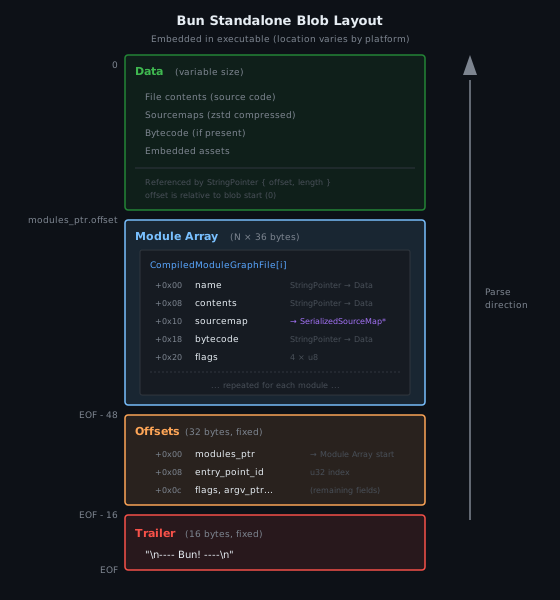
The trailer is a fixed marker at the very end. Immediately before it is the Offsets struct, which tells you where everything else lives:
// src/StandaloneModuleGraph.zig
pub const Offsets = extern struct {
    byte_count: usize = 0,              // total size of the blob (excluding trailer)
    modules_ptr: bun.StringPointer = .{}, // offset + length of the module array
    entry_point_id: u32 = 0,            // index into module array
    compile_exec_argv_ptr: bun.StringPointer = .{},
    flags: Flags = .{},
};
A StringPointer is { offset: u32, length: u32 }: an offset into the blob and a byte length.
The Module Array
modules_ptr points to an array of CompiledModuleGraphFile structs:
// src/StandaloneModuleGraph.zig
pub const CompiledModuleGraphFile = struct {
    name: Schema.StringPointer = .{},      // virtual path (e.g. "/$bunfs/root/index.js")
    contents: Schema.StringPointer = .{},  // bundled JS/TS output
    sourcemap: Schema.StringPointer = .{}, // serialized sourcemap (optional)
    bytecode: Schema.StringPointer = .{},  // precompiled bytecode (optional)
    encoding: Encoding = .latin1,          // .binary, .latin1, or .utf8
    loader: bun.options.Loader = .file,    // file type
    module_format: ModuleFormat = .none,   // .none, .esm, or .cjs
    side: FileSide = .server,              // .server or .client
};
Each entry describes one embedded file. The name field contains the virtual path that Bun uses internally to reference the file.
Virtual Paths
Bun doesn’t store your original filesystem paths directly. Instead, it prefixes everything with a virtual filesystem root:
- POSIX:
/$bunfs/ - Windows:
B:\~BUN\
So if you compiled src/index.ts, the embedded name might be /$bunfs/root/src/index.js. This prefix is defined in StandaloneModuleGraph.zig:
pub const base_path = switch (Environment.os) {
    else => "/$bunfs/",
    .windows => "B:\\~BUN\\",
};
Loader Types
The loader field indicates what kind of file this is:
| Value | Loader | Description |
|---|---|---|
| 0 | jsx | JSX file |
| 1 | js | JavaScript |
| 2 | ts | TypeScript |
| 3 | tsx | TSX file |
| 4 | css | CSS |
| 5 | file | Binary asset |
| 6 | json | JSON |
| 7 | jsonc | JSON with comments |
| 8 | toml | TOML |
| 9 | wasm | WebAssembly |
| 10 | napi | Native addon |
| … | … | (and more) |
For JS/TS files, contents holds the bundled output. For assets (loader = file), it’s the raw bytes.
Where the Blob Lives
Bun stores the blob differently on each platform.
Mach-O (macOS)
The blob lives in a dedicated section:
- Segment:
__BUN - Section:
__bun
The section starts with an 8-byte size prefix (uint64_t), followed by the blob data (from c-bindings.cpp):
struct BlobHeader {
    uint64_t size;
    uint8_t data[];
};
extern "C" BlobHeader __attribute__((section("__BUN,__bun"))) BUN_COMPILED = { 0, 0 };
To extract: read the __BUN,__bun section, skip the size prefix, then read size bytes of blob data.
The size prefix changed between Bun versions:
- Bun < 1.3.4: 4-byte
u32size prefix - Bun >= 1.3.4: 8-byte
u64size prefix (changed in #25377 for bytecode alignment)
If you’re writing an extractor, you’ll need to handle both formats or detect which you’re dealing with.
PE (Windows)
The blob lives in a section named .bun. Same format as Mach-O: size prefix followed by blob data. Same version split applies (4-byte before Bun 1.3.4, 8-byte after).
// src/bun.js/bindings/c-bindings.cpp
pe_section_size = (uint64_t*)sectionData;
pe_section_data = sectionData + sizeof(uint64_t);
ELF (Linux)
ELF is different. The blob is appended to the end of the file (not in a named section). Bun scans backwards from EOF looking for the trailer:
// src/StandaloneModuleGraph.zig
std.posix.lseek_END(self_exe.cast(), -4096) catch return null;
// ... scan for trailer ...
var end = @as([]u8, &trailer_bytes).ptr + read_amount - @sizeOf(usize);
const total_byte_count: usize = @as(usize, @bitCast(end[0..8].*));
The last 8 bytes before the trailer contain the total byte count. Work backwards from there to find the Offsets struct and module data.
Parsing the Blob
1. Find the trailer ("\n---- Bun! ----\n") at the end
2. Read the 32 bytes before it as Offsets
3. Use modules_ptr to locate the module array
4. Iterate CompiledModuleGraphFile[], slicing out name/contents/sourcemap
Pseudocode:
TRAILER = b"\n---- Bun! ----\n"

def parse_blob(data: bytes):
    # Validate trailer
    assert data[-16:] == TRAILER

    # Parse Offsets (32 bytes before trailer)
    offsets_bytes = data[-16 - 32 : -16]
    byte_count = struct.unpack("<Q", offsets_bytes[0:8])[0]
    modules_offset = struct.unpack("<I", offsets_bytes[8:12])[0]
    modules_length = struct.unpack("<I", offsets_bytes[12:16])[0]
    entry_point_id = struct.unpack("<I", offsets_bytes[16:20])[0]
    # ... etc

    # Parse module array
    module_size = 36  # sizeof(CompiledModuleGraphFile)
    module_count = modules_length // module_size
    modules = []

    for i in range(module_count):
        offset = modules_offset + i * module_size
        mod = parse_module(data, offset)
        modules.append(mod)

    return modules
Sourcemap Format
The bundled output is useful, but the real prize is recovering original source files. Bun includes sourcemaps for stack traces and debugging, and those sourcemaps embed the original source content (zstd-compressed).
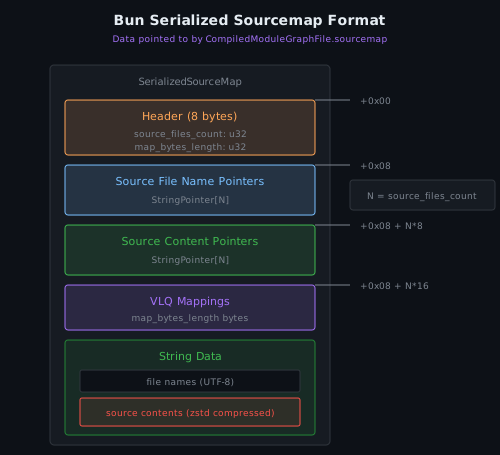
The sourcemap field in each CompiledModuleGraphFile points to Bun’s serialized sourcemap format, a compact binary structure (not standard JSON):
// src/StandaloneModuleGraph.zig
pub const SerializedSourceMap = struct {
    bytes: []const u8,

    pub const Header = extern struct {
        source_files_count: u32,  // number of original source files
        map_bytes_length: u32,    // length of VLQ mapping data
    };
    // ...
};
Sourcemap Layout
Extracting Original Sources
To recover the original files:
- Read the header to get
source_files_count - Read
NStringPointers for file names - Read
NStringPointers for compressed contents - For each file:
- Slice out the name using its StringPointer
- Slice out the compressed content using its StringPointer
- Decompress with zstd
def extract_sourcemap(data: bytes):
    # Header
    source_count = struct.unpack("<I", data[0:4])[0]
    map_length = struct.unpack("<I", data[4:8])[0]

    # Pointer arrays start after header
    names_start = 8
    contents_start = names_start + source_count * 8

    files = []
    for i in range(source_count):
        # Name pointer
        name_ptr = parse_string_pointer(data, names_start + i * 8)
        name = data[name_ptr.offset : name_ptr.offset + name_ptr.length].decode()

        # Content pointer (zstd compressed)
        content_ptr = parse_string_pointer(data, contents_start + i * 8)
        compressed = data[content_ptr.offset : content_ptr.offset + content_ptr.length]
        content = zstd.decompress(compressed)

        files.append((name, content))

    return files
The Tool
I wrote bun-unpack to handle the platform differences, version quirks, and path normalization:
# Install
uv tool install git+ssh://git@github.com/xpcmdshell/bun-unpack.git

# Recover original sources (default)
bun-unpack ./sample -o out/

# Extract bundled output + sourcemaps instead
bun-unpack ./sample --bundle -o out/
Two modes:
- Default: Recover original project tree from embedded sourcemaps
--bundle: Extract the bundled JS output + write.mapfiles
Caveats
- Not every Bun executable includes
sourcesContent. If the build omitted it, source recovery won’t work, but--bundlestill extracts the bundled output. - Sourcemap paths can include absolute paths from the build machine, URL prefixes (
webpack://), or traversal sequences. Normalize carefully if writing to disk.
Back to Droid
So what did extraction actually yield?
❯ tree
.
├── acp
│   ├── ACPAdapter.ts
│   ├── protocol
│   │   └── translator.ts
│   ├── session
│   │   ├── ACPSessionManager.ts
│   │   └── mcpConfigMerge.ts
│   ├── tools
│   │   ├── permissions.ts
│   │   └── utils.ts
│   └── utils
│       └── nodeStreams.ts
├── agent
│   ├── autonomy.ts
│   ├── file-edit
│   │   ├── edit.ts
│   │   └── utils.ts
│   ├── messaging.ts
│   ├── tool-confirmation.ts
│   ├── tools.ts
│   └── warmup.ts
├── api
│   ├── config.ts
│   ├── init.ts
│   └── session.ts
├── app.tsx
├── auth
│   ├── identity.ts
│   ├── stored
│   │   └── utils.ts
│   └── workos
│       └── utils.ts
│
│   ... snip ...
│
70 directories, 381 files
A full TypeScript codebase. Original project structure, intact.
bun-unpack is on GitHub if you want to try it yourself.